Remove left entry in an instant
Device Cleanup Tool is a handy utility developed by Uwe Sieber who also created the USB Device Tree Viewer. This software solution can quickly delete all the entries left by an attached device to your computer system. It also allows to select and remove multiple device entries simultaneously.
Top Recommended Alternative

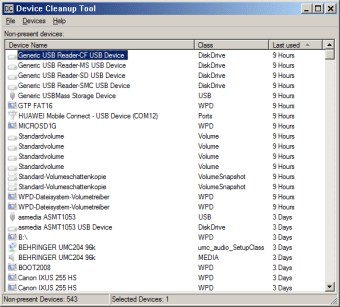
Moreover, it updates you about the last time the device was used so, you are aware that the right ones are cleaned up. You can freely download and utilize this program without any usage restrictions. Device Cleanup Tool is a portable tool that requires no installation and can be launched anywhere.
Delete in one quick operation
You can easily familiarize yourself with the operation of the Device Cleanup Tool in no time at all. Thanks to the simple and straightforward user interface layout that it provides, the functions can be more or less self-explanatory. Although if you wish to remove devices, you will be required to have Administrator privileges as it will result in an error otherwise.
In one simple and quick operation, you'll be able to neatly remove the entries left. Once the program is launched, it will display all the devices you registered or attached to your PC. As stated, it provides you the capability to thoroughly clean up multiple entries in one go. Moreover, it informs you about the last time your device got used so, you know if it's safe to remove already.
Even novice users will find this lightweight program easy to use. You can deploy it with minimum effort. Keep in mind that if you removed and attached a device again, it'll be detected as new. Thus, reinstalling wouldn't be a difficult thing to do. Before removing any items, though, it's suggested that you create a System Restore point so, if an issue occurs it will be easy to recover.
Time-saving cleanup program
Device Cleanup Tool is truly a useful solution that can help you save time and effort. It is efficient to deploy and does its job with no unnecessary fuss. You don't even need to install it. In a streamlined operation, you can now select and remove multiple unused device entries with so much ease. It is intuitive especially for beginners, no learning curve will be required.